
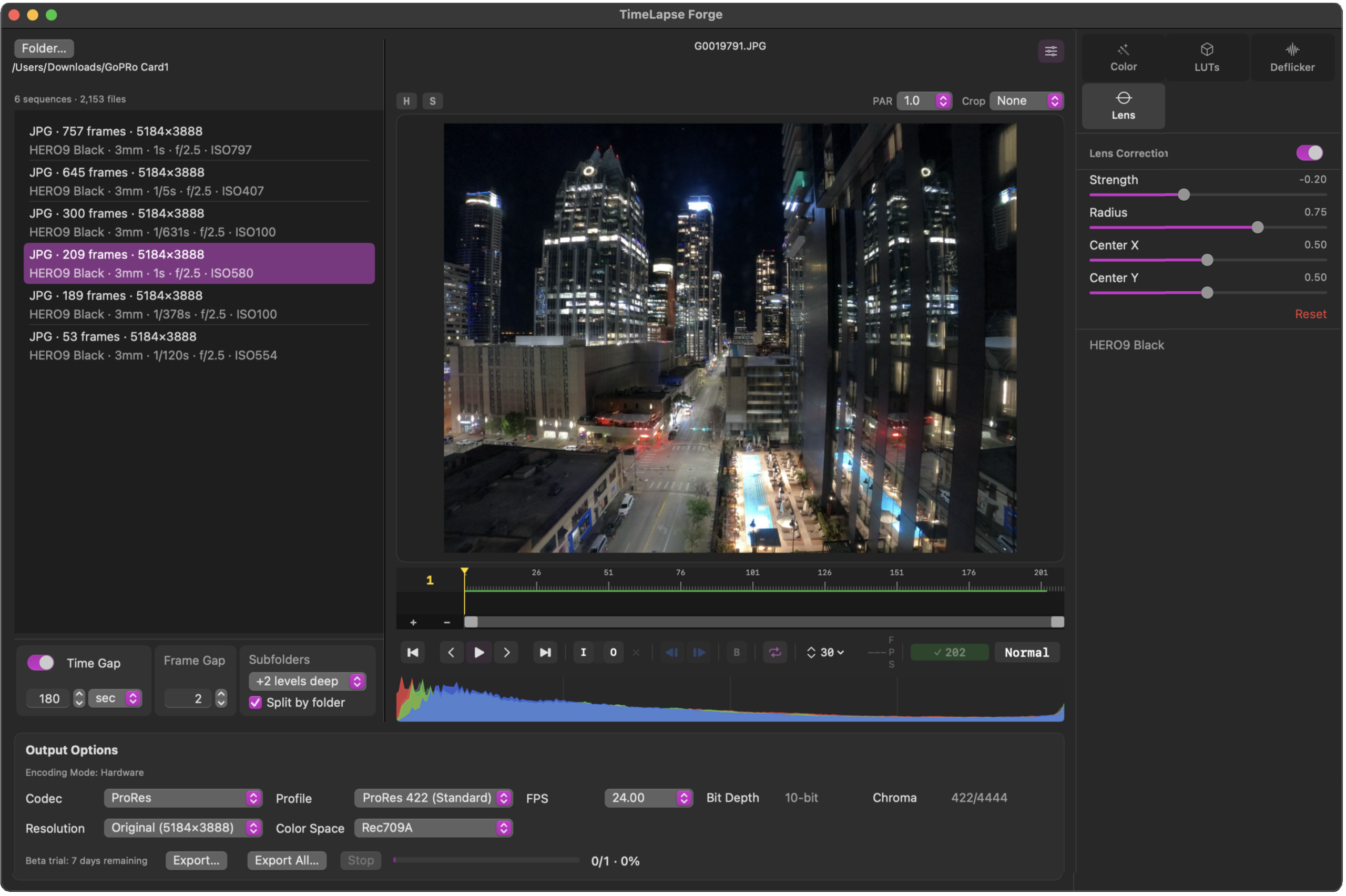
Load images directly from your card. Play it, trim it, correct it all in real time.
Batch export MOV in H.264, H.265 or ProRes. Done.
Buy direct and download.
Intro Pricing of $79
Timelapse creation made fast, simple and efficient.
Drop a folder of mixed images in. 5000 or more images ? Go ahead !
Multiple sequences and formats are automagically separated correctly.
Never waste time again manually sorting files into folders.
Point TimeLapse Forge at your image (DCIM) folders and it does the rest.
Multiple sequences in one folder as shot by the camera,
Sequences split across subfolders due to 999 file in a folder rollover in camera
A battery swap that broke your cadence or numbering
Mixed JPEG, HEIC and RAW in the same location ? They are all handled all intelligently, automatically. You adjust how time gaps trigger a new sequence, missing frames. or turn detection off entirely.
• Nested folders scanned up to 2 levels deep, Perfect for working with sequences on your drives.
• Sequences grouped by using our special intelligent sorting technology
• Adjustable time gap tolerance to ignore gaps due to battery changes or just extending the sequence shooting together or split into new shots. User adjustable, near instant resort.
• Mixed formats in the same folder sorted into separate sequences automatically based on format type
• Mixed shots from different cameras ? TimeLapse Forge will sort that too !
• Near-instant sort on folders of 4,000 to 5,000 images or more.
• No file count limit. Should be fine with 100,000 images or more in a session.
Your camera’s native files directly supported.
No wasted time or drive space for conversions.
No convoluted multi application workflow.
RAW files load directly. No DNG, TIF or Jpeg 2000 intermediate exports, no folder(s) of huge duplicate converted files eating up limited SSD space, no waiting for it to happen. What came out of the camera is what you work with.
Camera metadata support: body, lens, ISO, shutter, aperture. Displayed with sequence info and embedded into the exported MOV for tracking in post if needed. Clever.
Canon CR2, CR3 • Nikon NEF • Fujifilm RAF uncompressed and compressed • Sony ARW • Panasonic RW2 • Olympus OM System ORF • Leica DNG • Hasselblad 3FR • Pentax PEF • DJI DNG • GoPro • and many more
JPEG • HEIC • HIF 10-bit • TIFF • DNG • PNG • OpenEXR • BMP • PSD • and more
See what you have before you export anything. Just hit play.
Realtime playback reflects your current adjustments. Color corrections, deflicker, crop, lens correction. All of it shows up in the preview as you work, at standard frame rates. A cache bar in the timeline shows how much is held in RAM.
For long RAW sequences which don’t fit into cache, dropping playback to 12 or 6fps keeps things smooth without giving up what you’re seeing. You can play directly off a camera card for a quick first look before you’ve even copied anything. This is a giant time saver for checking your work.
Deflicker and exposure smoothing
that actually understands what’s going on.
Flicker and multi frame exposure changes have a lot of causes and they don’t all look the same. More importantly, they don’t always affect every part of a frame equally. Shadows can change differently than highlights and a global correction that fixes one can easily damage the other. Problem solved.
TimeLapse Forge analyzes every frame with a sophisticated multi-zone exposure tool utilizing GPU acceleration. Then corrects per tonal zone shadows, midtones, and highlights independently. You control how much correction applies to each zone, and you can override individual frames when one needs its own treatment. The exposure meter intelligently ignores moving bright spots like the sun crossing the frame or headlights passing through so they don’t skew the measurement. If you need to lock analysis to a specific area of the image like the sky, draw a sample box anywhere on the frame. Its fast and adjustable.
Analysis controls:
• Exposure Smoothing Range: how many neighboring frames shape the reference curve.
• Variation Threshold Adjustment: minimum EV deviation to flag a frame (start at 0.03–0.05 EV)
• Max Correction: limits correction per frame if needed.
Correction modes:
• Frame-by-Frame: for isolated single-frames if needed.
• Small Group — for runs of groups of frames that are off, interpolate smoothly between good neighboring frames.
Per-zone correction strength:
• Shadows • Midtones • Highlights • adjustable 0 to 2.0± stops per zone
• Specular highlights and direct light sources are never corrected thanks to the intelligent exposure meter
Analysis is stored per sequence. Come back to a sequence later and everything is exactly where you left it. Make changes and it analyzes in seconds.
When a bad frame just needs to go away.
The camera gets bumped, wind gust shake, and the result is a motion blurred frame. Press B ( for blend ) and the frame is gone. Its replaced non-destructively with a blend of the surrounding frames. Toggle blend on or off anytime, play it back in real time , and see which mode works for the shot.
• Blend 1 or 2 frames : non-destructively remove the bad frame, then dissolve across immediate or wider neighbors. The type of fix you’d do in your video editor. For many shots this works well and is a fairly invisible fix.
• Optical Flow 1 or 2 frames : use it on sequences with camera movement like a motion control slider with pan, tilt, or rotation. GPU accelerated as you’d expect.
Color correction in the same app.
Full per sequence color correction. It’s non-destructive and runs in real time even during play. Deep color using linear color space floating point 16bit math on the GPU using custom Metal code. It’s super fast and ultimate quality. Best of all extreme adjustments never clip image data like whites that can’t be recovered with the next adjustment. Example : apply large exposure increase, then reduce white point or highlights to bring that range back.
Highlights and Shadows controls include exclusive Bias adjustment that lets you focus a correction tightly on the extreme end of the range or spread it more gradually across the tones.
Exposure • Contrast • Highlights • Shadows • Whites • Blacks • Saturation • Shadow Saturation • Vibrancy • White Balance
LUT Support
Does you camera let you shoot stills in a log format ? no problem ! Apply up to two LUTs simultaneously in real time. One for colorspace conversion, the second as a Look LUT.
Standard 3D .CUBE format in 35 and 65 point versions.
DaVinci Resolve LUT folders are detected automatically if Resolve is installed. There is no need to duplicate LUTs for Timelapse Forge.
There is also a TimeLapse Forge user LUT folder plus a fourth user-configurable path pointing anywhere on your system.
Crop and aspect ratio.
Common ratios from 4:3 through 2.35:1, vertical formats like 9:16 included. The crop box displays on the preview window. Adjust it into position and see exactly what’s in and what’s out of the frame. Output resolution and crop interact intelligently: pick either the native resolution of the images or scale to standard sizes like 4K 4096 X 2680. If input vs output matches then it frames cleanly, mismatched aspects ( input vs output ) letterbox or sidebox predictably without surprises.
Anamorphic Lens Support
If you can put an anmorphic lens on your stills camera, why not shoot timelapse with it !
PAR aspect ratios of 1.0, 1.25, 1.33, 1.5, 1.8 and 2.0.
Export Files Ready To Edit In Your NLE or Upload To Social Media
Hardware accelerated* encoding when possible. Correct colorspace metadata set in the MOV file. Drag clips right into your timeline and it looks correct.
Codecs: Apple ProRes 422, 422 HQ, 4444, H.264, H.265/HEVC
Resolution: Original image size, crop to standard 4K UHD through 1080p presets or Custom
Frame rates: 23.976, 24, 25, 29.97, 30
Bit depth: 8-bit and 10-bit, codec dependent,
Chroma: codec dependent 4:2:0, 4:2:2, 4:4:4
* Hardware acceleration of encoding is M model chip dependent. While all have of these CPUs have ProRes encoders, H.264 and H.265 specific capabilities will vary. For example M1 supports H.264 4:2:0 colorspace on hardware, but not 4:2:2. M2 and higher supports 4:2:2. TLF intelligently probes the hardware to default to hardware encoding whenever its supported, but of course YMMV based on your exact hardware.
Built for Apple Silicon.
TimeLapse Forge is built exclusively for Apple Silicon M1 and later. The whole pipeline — decode, analysis, correction, preview, export — runs on the hardware Apple designed for exactly this kind of work. Parallel processing of RAW images, GPU and custom Metal code, caching based on machine resources.
Three performance modes let you decide how much of the machine to utilize:
• Low leaves lots of headroom for other apps
• Medium default for most needs balances speed vs working in other apps
• Max — utilize everything the machine has, go as fast as it can
16 GB RAM minimum highly recommended. 8 GB supported with reduced sequence capacity for caching. Quiting apps you don’t need running to free up RAW helps on 8gb machines.
The more Performance CPU cores and GPU cores the better, TLF will use them.
Fast internal or external SSD recommended for longer sequences.
TimeLapse Forge
One-time purchase. No subscription. Small versions updates included.
$99 Regular Price $79 intro pricing
Free trial available with watermark
macOS 15 or newer – Apple Silicon required – internet connection for activation
Download on the Mac App Store